WARNING: This Plugin is no longer working under WordPress 2+. It is currently not supported, though the author may be contacted if you are interested in taking over support of this Plugin. To search the Codex, visit it directly and use the search function.
As one of the many volunteers helping give back to the WordPress Community and helping with the WordPress Codex and WordPress Support Forum, I join the chorus of those who recommend to all WordPress users: Search First.
There is now an amazing assortment of sites and resources for WordPress users to get the information they need to the questions they have and the help they need. And when it comes to getting help with WordPress, the two above resources are top of the list, the Codex and the Forum.
Now, with the amazing coding skills and talent of two friends of mine, Andrew (also known as Jalenack) and Owen (also known as Ringmaster), searching the WordPress Codex and Forum is easier than ever. They developed the Codex Search Plugin.
 This WordPress plugin doesn’t just search the Codex, it searches both the Codex and the WordPress Forum, and does it from within the WordPress Administration Panels. You don’t even have to leave your control panels for WordPress to find the help you need. Wow!
It’s simple. Download and install the plugin to your WordPress site. Activate it from the Plugin panel. On every page of your Administration Panels, at the top next to the title of your site and the link to “View Site” you will see the quiet and unimposing search box. All it says is “Search”.
Type in the information you are searching for and while it is searching, it displays a box that tells you it is searching. I like helpful programs like this that say “Hey, I’m working here!”

It then displays a two part list of results. To hide the list, click “Hide List” at the top, but for now, let’s explore the search results.
 In the upper part of the list you will find titles and excerpts of articles from the WordPress Codex. There are usually enough words in the excerpt to help you determine if the information in that article is what you need.
At the bottom of the list is a collection of links to posts and threads on the WordPress Forum that also contain the words from your search. While the results are few, the more specific you are with your search keywords, the more likely the appropriate information will “rise to the top of the list”. For example, don’t just search for “plugins” but search for “writing plugins” or “comment spam plugins” or “gallery plugins” to help narrow the search results.
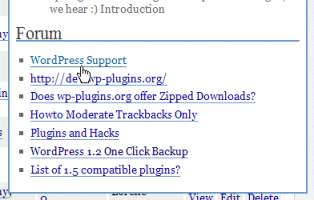 To open any of these results and not leave the comfort of your WordPress Admin Panels, right click on the link and choose “Open in New Window” or “Open in New Tab”. That will open a new browser window or tab and load that link into it so you can keep WordPress open and read about how to solve the issue at hand or answer your question. You can quickly click between the two pages if you need to attempt the solution and continue to refer to the information. Nice and easy.
If this isn’t information at your fingertips, I don’t know what is. WordPress volunteers get lots of requests for a downloadable manual and instruction book. With this easy to use plugin for searching the Codex and Forum, the manual and information is literally right at your fingertips!
Thanks, Jalenack and Ringmaster, and everyone who helped them.